Crimson Desert has Twitch Drops running right now and honestly the rewards are sick. You can get a full Blue Scout armor set plus horse gear just for watching streams. Free cosmetics, no catch. Let's break it down.
What Are Twitch Drops?
If you haven't done Twitch Drops before, it's super simple. You watch Crimson Desert streams on Twitch, your watch time gets tracked, and you unlock free in-game items at certain milestones. That's literally it. Just have a stream open and let it run.
Week 1 Rewards (March 20 - March 26, 2026)
Week 1 is where you get the full Blue Scout character set. Four reward tiers, and you're going to want all of them.
60 Minutes: Braised Meat x10 + Blue Scout Lantern
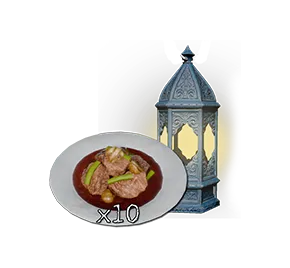
One hour in and you've already got 10 Braised Meat (solid early game food) and the Blue Scout Lantern. Easy.
120 Minutes: Blue Scout Jewelry Set
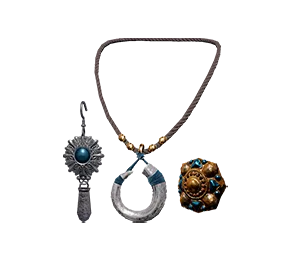
Two hours gets you the Blue Scout Earrings, Blue Scout Ring, and Blue Scout Necklace. The accessories really tie the whole set together.
180 Minutes: Blue Scout Shield
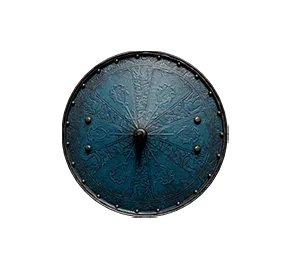
Three hours and you unlock the Blue Scout Shield. This thing looks clean with the rest of the gear.
300 Minutes: Blue Scout Cloak, Armor, and Helmet
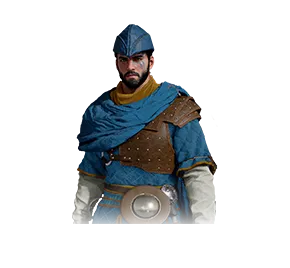
Five hours total for the main event. Blue Scout Cloak, Blue Scout Armor, and Blue Scout Helmet. This is the full fit and it goes hard. Definitely worth leaving a stream on in the background for a day.
Week 2 Rewards (March 27 - April 2, 2026)
Week 2 is all about dripping out your horse. Can't have your character looking fresh while your mount is running around naked.
- 60 Minutes: Blue Scout Stirrup
- 120 Minutes : Blue Scout Horse Mask
- 180 Minutes: Blue Scout Saddle
Three hours across the whole week and your horse is fully kitted. Not bad at all.
How to Actually Claim Your Drops
This is where people mess up so pay attention.
Step 1: Watch Streams
Go to Twitch and find any Crimson Desert channel with Drops Enabled in the tags. Open it up and let it play. You can swap between different streamers too, your watch time carries over.
Step 2: Claim in Your Twitch Inventory
Once you hit a reward tier, go to your Twitch Inventory and hit the Claim Now button. This part is important. If you don't manually claim it, you don't get it. Don't skip this step.
Step 3: Link Up and Log In
Head to the Crimson Desert Drops page and log in with the Twitch account you watched the streams on. Steam players get the rewards delivered straight into the game. PlayStation and Xbox players get a coupon code to redeem on their platform.
Things You Should Know
- You don't need to own the game to earn drops, but you obviously need it to use the items
- You can switch between channels freely, watch time stacks across all Drops-enabled streams
- Rewards are not instant after claiming on Twitch. You still need to log in through the Crimson Desert site
- Rewards only go to one account, no duplicates if you have multiple game accounts
- Once you pick a platform for a reward (Steam/PS/Xbox), you can't change it after
Redeeming Codes on Console
PlayStation: Go to the PlayStation Store, tap your avatar, then hit Redeem Codes and punch in your coupon.
Xbox: Open the Microsoft Store or go to xbox.com/redeemcode and enter your code there.
FAQ
Do I need a special edition of the game? Nope. Twitch Drops are completely free for everyone.
Can I watch different streamers? Yeah, watch time adds up across all Crimson Desert streams that have Drops enabled. No need to stick to one channel.
How do I check my progress? Your Twitch Inventory shows exactly where you're at and what's ready to claim.